
Most businesses already rely on multiple software tools – custom CRMs, HR systems, accounting tools, or legacy applications built years ago. Replacing them overnight with a new ERP isn’t always practical. That’s where Odoo ERP stands out because of its flexibility and open architecture.
Unlike other ERP systems, Odoo can integrate with nearly any external system, from your in-house CRM or HR platform to a fully custom-built inventory or accounting tool, using APIs, middleware, or database syncs. It can even connect smoothly with new website development projects, ensuring your online and backend systems operate in perfect sync. Instead of forcing you to start from scratch, it lets your existing systems talk, sync data, and automate processes across platforms.
Let’s break down how Odoo integrates, the technical methods, real use cases, cost factors, and how to decide between integration vs full migration.
Can Odoo ERP Integrate with Custom-Built or Third-Party Systems?
Yes – this is one of Odoo’s biggest strengths. Odoo is built on a modular, open-source framework. It’s designed to connect with external software through RESTful APIs, XML-RPC, or webhooks, which basically allow real-time communication between Odoo and other platforms. If your current system can send or receive data through an API, database, or even CSV export, it can likely be integrated with Odoo.
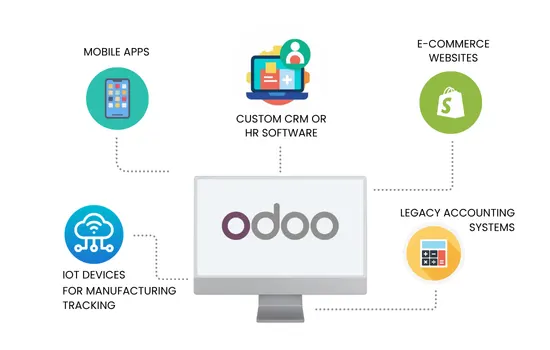
The real advantage is that Odoo doesn’t just “import data”, it can automate workflows across systems. For example, when a customer places an order in your custom app, Odoo can automatically create a sales order, update stock, and generate an invoice all in one flow.
How Odoo Connects to Other Software?
There isn’t one single way to connect Odoo; it depends on how your other system is built. Typically, integration happens through one of these four methods.
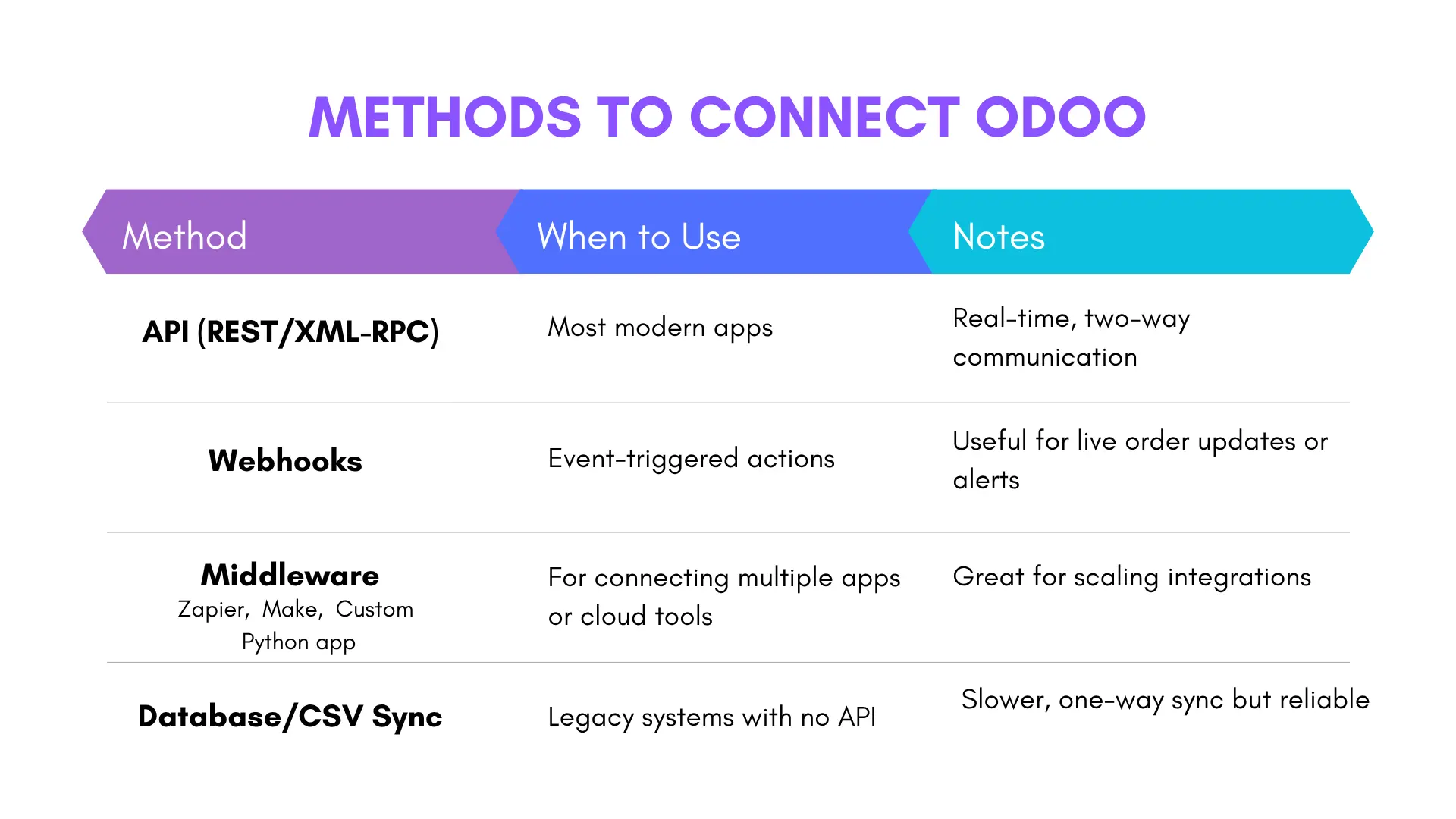
APIs are usually the cleanest and fastest way, but I’ve seen database syncs work perfectly fine for internal systems that don’t need real-time updates.
Simplified Odoo Integration Workflow
Integrating Odoo with a Custom CRM or HR System
Plenty of companies already use a CRM or HR app that fits their exact needs. Instead of ditching it, they integrate it with Odoo to unify reporting and operations.
Here’s how it usually works:
- Leads and customers sync automatically between the CRM and Odoo’s Sales module.
- Employee data, attendance, or payroll details flow into Odoo’s HR or Accounting apps.
- Managers see a unified dashboard across both systems, while employees keep using the interface they’re comfortable with.
This approach keeps your existing tools in play while still benefiting from Odoo’s reporting, accounting, and workflow automation capabilities.
Integrating Odoo with an E-commerce Platform
Odoo offers seamless integration with third-party eCommerce tools, making it easier to manage inventory, track orders, and handle sales operations from production to delivery – all within a single system.
It includes built-in connectors for major platforms such as Shopify, WooCommerce, Magento, PrestaShop, BigCommerce, Wix, and Squarespace, as well as integrations for popular marketplaces like Amazon, eBay, and Walmart.
For businesses building unique online stores, Odoo can be integrated with custom eCommerce website development projects through its open-source architecture and robust API support in multiple programming languages, including Python, Ruby, PHP, and Java. This flexibility ensures smooth synchronization between your website, inventory, and backend systems – giving you complete operational control.
Key Benefits of Integrating Odoo ERP with E-commerce
1. Centralized Product & Inventory Management: With integration, your product catalog, stock levels, and pricing are managed in one place. Any updates in Odoo instantly reflect on your e-commerce site — ensuring consistency across all sales channels.
2. Streamlined Order Processing and Fulfillment: Odoo automatically syncs customer orders from your e-commerce store, creating corresponding sales orders, delivery notes, and invoices. This automation reduces manual data entry and accelerates the entire fulfillment cycle — from order placement to shipment.
3. Financial and Accounting Accuracy: Every online transaction seamlessly syncs with Odoo’s Accounting module, ensuring that your books remain accurate and up-to-date.
4. Enhanced Customer Experience & Personalized Marketing: When integrated with Odoo CRM and Marketing Automation, every sale enriches customer profiles with order history, preferences, and behavior data.
5. Scalability and Multi-Channel Support: As your business grows, Odoo ERP offers the flexibility to seamlessly scale and support your evolving needs. It can accommodate multiple online stores or marketplaces, while also managing multi-currency and multi-language setups. This makes it an ideal solution for businesses operating in both B2B and B2C environments, all under one unified system. This makes it an ideal solution for businesses operating in both B2B and B2C environments, all under one unified system.
It also supports features like discounts, product reviews, and automatic stock updates. Essentially, your e-commerce and back-office run as one ecosystem – no manual data juggling. That kind of automation doesn’t just save time; it directly improves customer experience and order accuracy.
How Much Does It Cost to Integrate Odoo with Another System?
In India, the cost to integrate Odoo ERP with another system can vary widely – typically anywhere from ₹1.5 lakhs to over ₹30 lakhs per project, depending on the complexity, scope, and the type of partner you work with. Some developers and agencies also charge on an hourly basis, usually starting from $10–$30 per hour (roughly ₹800–₹2,500).
The truth is, there’s no one-size-fits-all number. Your final cost depends on multiple technical and business factors.
| Estimated Project Cost Ranges in India | ||
|---|---|---|
| Project Scale | Description | Estimated Cost (INR) |
| Small-Scale | Simple integrations, few data fields, standard APIs | ₹1.5 lakhs – ₹8 lakhs |
| Medium-Scale | Multiple modules, customized workflows, moderate data migration | ₹8 lakhs – ₹25 lakhs |
| Large-Scale | Complex, multi-system integrations, extensive custom development | ₹25 lakhs – ₹80 lakhs+ |
Other factors that affect cost include:
- Whether the external software exposes a public API
- The number of Odoo modules involved
- Data volume and sync frequency
- Security or compliance requirements
- Ongoing maintenance or API version updates
If you’re planning an Odoo integration and need a clear cost breakdown, it’s best to get an expert assessment based on your current setup. Fegno Technologies, a certified Odoo implementation partner in Kochi, emphasizes a clear, expert assessment for Odoo integration planning and cost breakdowns.
To get an accurate cost estimate, we begin with a detailed discovery process to map your existing systems and evaluate the project’s complexity. This initial phase allows us to recommend the most cost-efficient and scalable integration plan before any development work begins
What We Need Before Starting an Integration Project
To estimate accurately and plan efficiently, we begin with a technical discovery phase, where we require:
- API documentation
- Database structure or sample data
- Workflow diagrams
- Integration objectives
- User roles & permission logic
- Expected automation rules
This ensures a cost-efficient and realistic plan b efore development begins.
Integration vs Full Migration: Which Path Is Better?
Here’s the honest truth – it depends on your current setup.
When Integration Is the Better Choice?
Integration is the smarter path when:
- Your existing software is reliable and still adds meaningful business value.
- It offers a decent API or any form of data exchange (REST, XML-RPC, DB access, or CSV).
- You want to modernize specific parts of your operation without disrupting everything at once.
- Your team is comfortable with the current interface and replacing it would slow productivity.
In this case, Odoo becomes the central hub, while your existing system continues doing what it does best.
When Full Migration Makes More Sense?
Migration becomes the better long-term choice when:
- Your existing software is outdated, unstable, or costly to maintain.
- There’s little or no documentation available.
- No proper API or integration path exists.
- You want to eliminate complexity and unify all departments under a single platform.
Odoo’s built-in suite, which includes CRM, HR, Accounting, Inventory, Manufacturing, Project, and Procurement, already covers 80% of the needs of most businesses. In many cases, replacing old systems outright ends up cheaper than forcing multiple integrations.
Rule of thumb:
Integrate – if your current software adds unique value and scales well
Migrate – if your software is holding you back technically or financially
Key Benefits of Odoo Third-Party Integrations
- Centralized data visibility across all system
- Real-time synchronization, no manual updates
- Automated workflows (less human error)
- Improved decision-making with unified reports
- Scalability — easily add new modules or apps later
- Lower operational cost through process automation
Once integration is live, teams spend less time maintaining spreadsheets and more time analyzing performance.
Also read: Odoo vs ERPNext: Which Open-Source ERP Should Your Business Choose?
Conclusion
Integrating Odoo ERP with your custom-built or third-party software isn’t just possible — it’s one of Odoo’s biggest strengths. With its open APIs, flexible modules, and wide connector ecosystem, it adapts to your workflow instead of forcing you to change everything overnight.
Whether you’re syncing your CRM, HR, or e-commerce platform, the result is the same: cleaner data, fewer manual tasks, and a more connected business.
If you’re unsure whether to integrate or migrate completely, start small — connect one system, test the value, and expand from there. Once you see how well Odoo plays with others, you’ll understand why it’s one of the most adaptable ERP platforms available today.

 Schedule An Appointment