
Push notifications are one of the most powerful tools for user engagement, retention, and re-engagement. Yet, even with perfect code and configuration, notifications don’t always reach users as expected. Developers and QA teams often encounter delayed, missed, or inconsistent notifications – especially on Android devices.
These aren’t bugs in your app. They’re the result of device-level restrictions, OEM customizations, network behaviors, and OS-level optimizations that prioritize battery life over background activity.
In this guide, we’ll break down the most common push notification delivery issues, explain why they happen, and provide actionable fixes based on our real-world testing experience and community insights.
Here are the most common issues observed during our QA:
Notifications arriving late – Sometimes minutes or hours after being sent.
Notifications only appear after unlocking the device – Common on Android.
Inconsistent delivery across devices – Some users receive them, others don’t.
Notifications not arriving until the app is opened – Defeating the purpose of “push.”
Complete silence on certain devices – Especially Xiaomi, Oppo, Vivo, Huawei, and Samsung models.
Where Your Notifications Disappear?
During our 6-month review of over 50+ client applications, we found repeated patterns in notification failures. These aren’t rare cases; they are ongoing problems.
1. Device & OS-Level Restrictions
Device and OS-level restrictions account for 20-40% of push notification failures, driven by battery optimizations that delay or block delivery until user interaction. Developers frequently ask, “Why are push notifications delayed on Android?” – often due to Doze mode, Adaptive Battery, and OEM customizations on Xiaomi, Oppo, Vivo, and Samsung devices. Similarly, push notifications not working in iOS is caused by permission denials, Focus modes, or APNs mismatches, especially post-iOS 17/18 updates.
Android Challenges
Budget and older Android models aggressively manage background activity via Doze, MIUI Autostart blocks, Samsung Adaptive Battery, Huawei limits, and OnePlus app closing, queuing notifications until unlock. Wi-Fi power saving, data savers, and app sleep modes (e.g., Samsung) further delay FCM/OneSignal pushes, even for active apps. Delivery drops 20-30% without intervention. They’re active barriers to your engagement strategy.
Fixes:
Don’t just ask for permission – educate and enable. Instruct users: Settings > Apps > [App] > Battery > Unrestricted; enable Autostart/Lock (Xiaomi), Protected Apps (Huawei).
Set FCM priority: high; add heartbeat pings for service persistence.
Disable Adaptive Connectivity/Battery globally during QA.
iOS Challenges
iOS enforces stricter rules: prior denied permissions, Focus/Do Not Disturb, Scheduled Summary batching (hours-long delays), sandbox/production APNs errors, and invalid tokens (BadDeviceToken). Opt-in rates hover at 43-51%, lower than Android’s 81-91%.
Fixes:
Reset permissions via reinstall/prompt refresh; toggle off Focus modes.
Use production APNs keys; refresh tokens on app updates/login.
Limit to non-silent pushes; validate payloads under 4KB.
This is not your app’s fault – it’s how the OS manages background services.
2. OEM Notification Blocking
Different manufacturers implement aggressive battery optimization:
- Xiaomi MIUI kills background services
- Samsung has Doze mode
- OnePlus closes apps aggressively
- Huawei has strict background execution limits
These directly affect Firebase, OneSignal, and even WhatsApp. So yes, even WhatsApp and Instagram notifications can lag on some devices. As a full-stack app development company in Kochi, we’ve debugged these issues across multiple OEM devices during extensive QA cycles.
How to Fix
OEM-level restrictions are the hardest push-notification problems to solve, because they’re outside your app’s control. But you can significantly improve delivery reliability by combining technical fixes with guided user onboarding.
1. Disable Battery Optimization
Ask users to allow your app to run “Unrestricted” or “Allow Background Activity.” This prevents the phone from killing your push service.
2. Enable Auto-Start / Background Run
Different brands use different labels:
- Xiaomi: Auto-start → On
- OnePlus/Oppo/Vivo/Realme: Auto Launch + Run in Background
- Huawei: Protected Apps → Add your app
- Samsung: Disable Adaptive Battery for your app
3. Use High-Priority FCM Messages
High-priority pushes tell Android not to delay delivery:
"priority": "high"
4. Check Notification Channels
On Android 8+, each notification has a channel.
If the user disabled a channel the notifications won’t show at all.
5. Add In-App “Fix My Notifications” Screen
Show users:
- Battery optimization status
- Background restriction status
- Disabled channel alerts
Let them tap → deep-link into the correct settings
6. Test on Real Devices
Always test push notifications on: Xiaomi, Samsung, Vivo, Realme, OnePlus, and Huawei.
OEM blocking isn’t your coding issue — it’s how Android manufacturers manage battery. By helping users whitelist your app and by sending high-priority Firebase messages, you fix most push delivery problems.
3. 3rd-Party Library Limitations
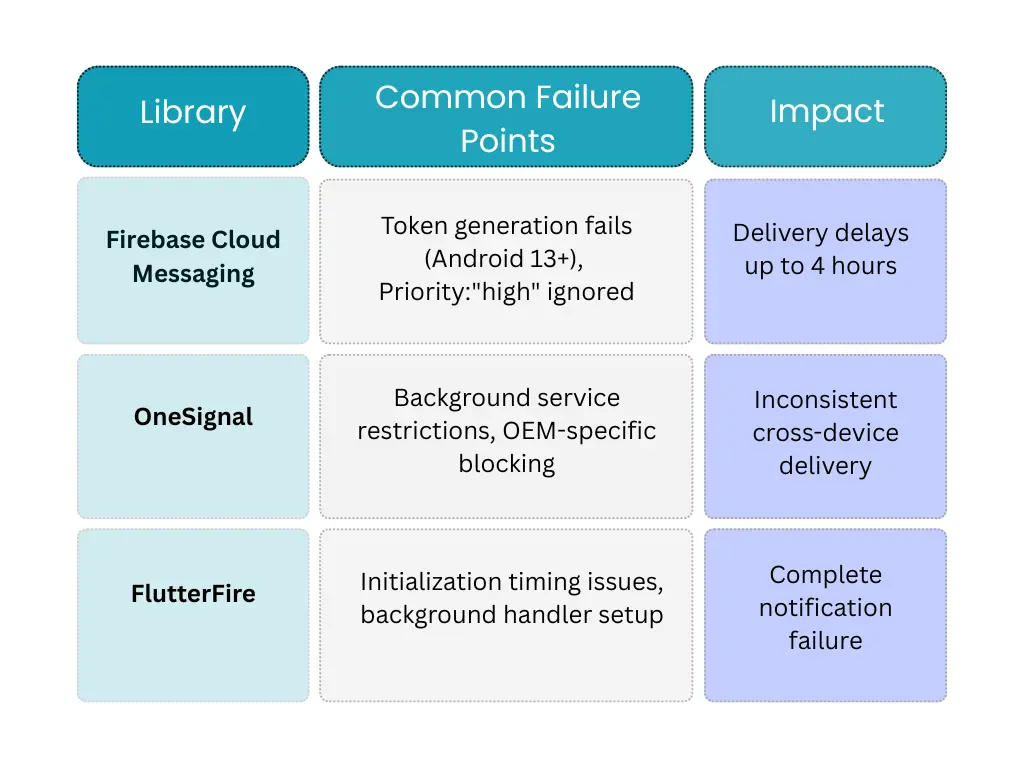
If you depend on: Firebase Cloud Messaging (FCM), OneSignal, AWS SNS or custom SDKs, they rely on background services that can be restricted at any time by the OS.
1. Token generation failures (especially on Android 13+)
2. Priority: “high” being ignored by OEM battery savers
3. Background service restrictions affecting FCM’s wake capabilities
4. FlutterFire initialization issues
This affects:
- Delivery speed
- Consistency
- Message rendering
- Notification triggers
How to Fix
1. Fix Token Generation Issues (Android 13+)
- Request POST_NOTIFICATIONS permission before generating the token.
- Refresh tokens properly using onNewToken / onTokenRefresh.
- Retry token fetch with backoff if it fails.
- Log token errors server-side to detect invalid/expired tokens.
2. Fix “High Priority” Messages Being Ignored
- Use “priority”: “high” in the FCM payload.
- Create Android notification channels with Importance: HIGH.
- Ask users to disable battery optimization / allow background activity.
- For critical apps, keep a foreground service running.
3. Fix Background Service Restrictions
- Use notification + data payloads instead of data-only pushes.
- Implement FCM heartbeat/keep-alive to maintain the connection.
- Ensure background handlers are native (avoid JS-only listeners).
- Use WorkManager (Android) for tasks that require reliability.
4. Fix FlutterFire Initialization Problems
- Initialize Firebase before runApp().
- Register background handler as a top-level function.
- Add correct service & permission entries in AndroidManifest.
- Enable Push + Background Modes in iOS entitlements.
- Keep FlutterFire packages updated to the latest stable versions.
5. Improve Reliability with Good Payload Practices
- Keep payload under 4KB.
- Validate JSON and structure before sending.
- Use FCM HTTP v1 API for better stability.
6. Add Fallback & Monitoring
- Track delivery with client-side “received” ACK.
- Retry missed notifications automatically.
- Use fallback channels: in-app, email, SMS for critical updates.
7. Network & VPN Filtering
On 4G/5G networks, notification packets can get:
- Delayed
- Queued
- Dropped during handoff
Corporate VPNs and unstable connections create invisible barriers:
- Port Blocking: Corporate firewalls block FCM ports (5228-5230)
- Network Handoff: Switching between Wi-Fi and mobile data breaks FCM connections
- Captive Portals: Public Wi-Fi requiring login pages block all push traffic
How to Fix
1. Detect Restricted Networks
Check if required ports for FCM/APNs are blocked
- Android FCM: Ports 5228–5230
- iOS APNs: Port 443
If blocked, show an in-app warning like: “Some network settings may prevent notifications from being delivered.”
2. Handle Wi-Fi ↔ Mobile Data Switches
Reconnect the FCM/APNs client when:
- Device switches networks
- The network drops temporarily
Use listeners (ConnectivityManager, NetworkCallback) to re-establish sockets.
3. Bypass Problematic VPNs
- Detect when a VPN is active and notify the user: “Notifications may be delayed due to VPN restrictions.”
- Encourage using standard mobile data or trusted Wi-Fi for real-time apps.
4. Gracefully Handle Weak Connections
- Use high-priority messages to minimize delay in unstable networks.
- Add delivery retries with exponential backoff.
- Use local caching + in-app notifications when pushes fail.
5. Test Across Different Network Conditions
- Test on poor signal (1–2 bars)
- Test with network switching
- Test behind common corporate VPNs
- Test on public Wi-Fi with captive portals
6. Provide a Fallback Channel
If the push is not delivered due to network restrictions:
- Send in-app alerts when the user opens the app
- Use email or SMS for time-sensitive messages
- Log failures for troubleshooting
Our Proven 3-Phase Approach
After solving notification issues for 32+ clients, we’ve developed this systematic framework:
Phase 1: Diagnostic (Weeks 1-2)
- Device Analysis: Identify your top 10 user device models
- Network Mapping: Analyze corporate vs. consumer network patterns
- Permission Audit: Track where users drop off in your permission flow
Phase 2: Implementation (Weeks 3-6)
We build a three-layer system:
- Primary Channel: Adaptive FCM with OEM workarounds
- Fallback System: Automatic escalation to in-app, email, SMS
- Monitoring: Real-time dashboard with proactive alerts
Phase 3: Continuous Optimization
- Weekly: Review OEM-specific failure rates
- Monthly: A/B test permission flows
- Quarterly: Update for new OS versions
Fallback Logic: What to Do When Push Notifications Fail
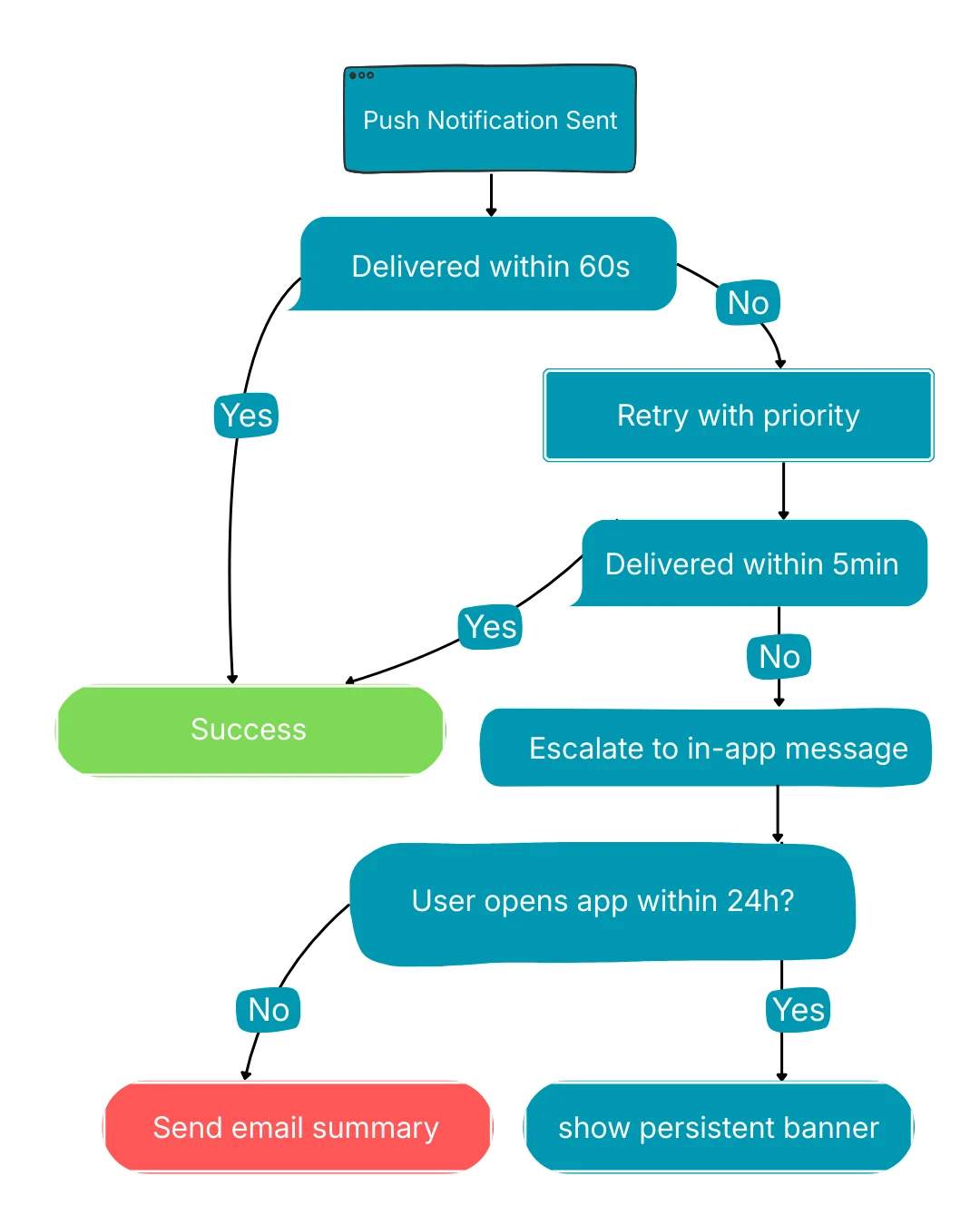
Modern push-delivery pipelines need more than OEM tweaks and library fixes—they need a structured fallback system that reacts intelligently when notifications fail. Even after optimizing FCM/APNs priorities, bypassing OEM restrictions, and handling network filtering, some pushes will still be delayed or dropped. That’s why production-grade apps implement a multi-stage reliability workflow: first validating delivery within a short window, retrying with elevated priority, escalating to in-app messaging if the push still doesn’t arrive, and finally triggering alternative channels like email when the user remains inactive. This logic ensures critical events are never lost, regardless of vendor restrictions, network instability, or background-service limits.
Design Isn’t the Problem - Delivery Is
You’ve invested in pixel-perfect UI/UX design. Your onboarding flows are intuitive, your interactions are delightful — but what happens when 30% of your users never see your critical alerts? In today’s mobile-first world, even the best UI/UX designing means nothing if the notification never reaches the user’s screen. After analyzing 50+ client applications, we consistently find the same pattern:
- Beautifully designed notifications that never arrive
- Perfectly timed messages that show up hours late
- User journeys broken by OS-level restrictions
This isn’t a design issue – it’s a delivery problem. Android’s Doze mode can delay a high-priority notification for hours. Xiaomi’s MIUI can kill a background service in minutes. Even WhatsApp and Instagram struggle with this across devices.
As a top software development company in Kochi, we’ve built numerous applications where notification reliability is treated as a core product feature, not an afterthought. We study how real users experience failures – which personas get affected most, where delivery breakdowns disrupt user flows, and where fallback channels must be integrated into the interface.
If your delivery rate is consistently under 85%, you’re expanding to international markets, or your product relies heavily on real-time notifications, it’s time to evaluate your notification architecture. Reliable delivery isn’t infrastructure – it’s retention. We’ve explored this more in our guide on Push Notifications and In-App Notifications to Increase Customer Retention.
Top performers don’t just send notifications – they guarantee delivery.

Swalahu is a passionate Flutter Developer with 3 years of experience at Fegno Technologies, specializing in creating seamless, high-performance cross-platform mobile applications. He has contributed to delivering scalable, user-focused apps that enhance digital experiences. Always eager to grow, Swalahu actively explores emerging trends in app development.

 Schedule An Appointment